
The Easiest Way to Find Stock Investment Ideas (Using Morningstar for Free)

Updated: Jun 3
Let’s return to the topic of stock investing, shall we?
We previously covered how to uncover great companies by identifying those with economic moats and fantastic leaders. Many of these companies are behind the products and services you love.
But finding these companies can feel overwhelming, especially if you're a beginner investor.

When I first started researching stocks, I had absolutely no idea where to begin. Sometimes I would randomly come across ticker symbols online or in publications. Other times, I’d look on the back of products I’d use to find out the manufacturer.
The problem was that many products were owned by the same parent companies, while other great businesses stayed mostly hidden unless you knew where to look.
Fortunately, there’s an easy way to find quality stock ideas without spending your weekends digging through random Reddit threads. Better yet, there’s a good chance you can access it completely free.
Let me introduce one of my favorite investing resources: Morningstar.
WHAT’S MORNINGSTAR?
Morningstar is an investment research company that analyzes thousands of stocks, ETFs, mutual funds, and bonds.
When I first started investing in individual stocks, Morningstar used to publish an annual list of 500 recommended stocks. Each stock recommendation included a detailed analysis with financial numbers.

I used to look forward to buying the updated edition every year. I was the weirdo in the cafeteria on lunch break engrossed in the book like someone researching players for their fantasy football team. It was a fantastic starting point for finding businesses worth researching further.
Unfortunately, Morningstar stopped publishing their annual list and went completely online, requiring a paid subscription.
The upside is that the online version updates constantly instead of leaving you stuck with year-old information.
And best of all, it’s possible to get access to that information absolutely free.
HOW TO GET MORNINGSTAR FOR FREE
Most people assume quality investing research requires another monthly subscription. But many public libraries quietly provide free access to premium investing tools through their online databases.
In my previous post, I mentioned that I get free access to Morningstar through my public library. In fact, Morningstar is partnered with many major regional libraries throughout the country to give library cardholders access to its Morningstar Investing Center.
All you need is a library card and a few clicks.
What you get for free:
Real-time data and analysis on stocks, funds, ETFs and bonds.
Investment tools, including stock screeners, calendars, and charts.
Educational resources covering investing and personal finance.
HOW TO FIND STOCK IDEAS ON MORNINGSTAR

Once you log into the Morningstar Investing Center, don’t panic. The layout looks like it was designed by accountants for other accountants. There are links everywhere, and the navigation takes a little getting used to.
I find that the navigation panel on the left is usually a good place to start. Here are the three sections I like to check.
1. MODEL PORTFOLIOS

Under Morningstar Research, click on Stocks. Then scroll down to Model Portfolios.
You’ll find links to four portfolios owned by Morningstar. Each portfolio shows the stocks currently included in that strategy.
Click the name of any stock to pull up an analysis report. This is the same information that Morningstar used to publish in their annual list.
2. MORNINGSTAR STOCKINVESTOR NEWSLETTER

Scroll further down the page to find links to the Morningstar StockInvestor Newsletter on the right-hand side.
Click on a link to open a PDF version of their monthly newsletter. Inside, you’ll find a list of the stocks held within Morningstar’s Hare and Tortoise portfolios, but the newsletter also includes some bite-sized company summaries.
I actually prefer the newsletter because it gives quick summaries without forcing you to open twenty different tabs.
3. STOCK SCREENER
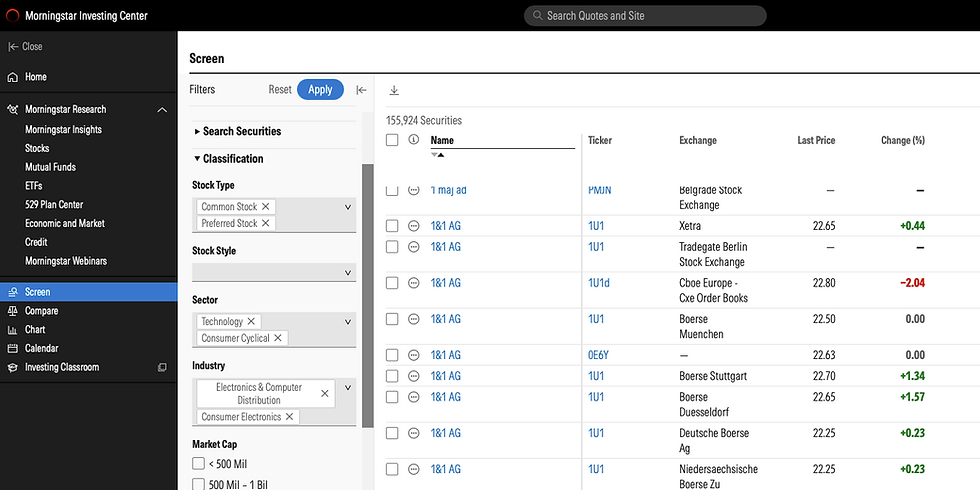
At the bottom of the navigation panel are investment tools.
Click on Screen to pull up a stock screener.
There are over 150,000 publicly traded stocks. Adjust as few or as many filters as you want on the screener to shrink that list down. There are a lot of filters, but here’s where you can start.
SECTOR & INDUSTRY: Since it’s important to invest only in businesses you understand, adjust the Sector and Industry filters under the Classification dropdown to find businesses that might hit the mark.
ECONOMIC MOAT: Companies without an economic moat can get crushed by competition surprisingly fast. If you use no other filters, at the very least, I would recommend using the Economic Moat filter under the Ratings dropdown. Check the boxes for Wide and Narrow to filter out companies that don’t have an obvious moat.
EXCHANGE: One last filter to cut the list down is the Exchange filter under the Reference dropdown. Select New York Stock Exchange and Nasdaq - All Markets to filter out any stocks that don’t trade on these two exchanges.
And yes, you actually need to hit the blue Apply button. I may or may not have spent several minutes wondering why nothing changed the first time I used it.
Once you have your filtered list, click on any company to pull up the analysis report.
FAQ
What is an economic moat?
An economic moat is a competitive advantage that helps a company fend off competitors over long periods of time.
How many filters should I use on stock screeners?
It’s easy to go overboard with filters. When I first started out, I tried to find the “perfect” stock by using every filter I could. But finding stocks is like dating. If you’re too picky, you’ll never find anybody. Keep filters simple so you don't eliminate companies that might be great for you.
Does Morningstar tell you what stocks to buy?
Morningstar’s reports are useful, but remember: investing analysis is still opinion. It’s not a magic crystal ball. Don’t blindly follow stock picks from anybody—including Morningstar. Use Morningstar as a starting point for your own research, not a substitute for thinking.
Uncovering companies to add to your watch list doesn’t have to feel like searching for buried treasure with a blindfold on. Tools like Morningstar can dramatically speed up the process and help you build a watch list of businesses worth researching further.
If you’ve never explored your library’s investing resources before, give it a shot. You might be surprised by how much free information is sitting there waiting for you.
In the next post, we’ll look at the financial numbers I use to figure out whether a company is actually great — or just good at marketing itself.
See you at the finish line!
Disclaimer: I’m not a licensed financial professional. This blog shares my personal experiences and opinions around money, investing, and early retirement. It’s for informational and educational purposes only—not financial, legal, or tax advice. Always do your own research or consult with a qualified professional before making any financial decisions.


Comments